VisuBezier
Provides a preview when hovering CSS easing functions.
Installations minus removals
Upgrades
- 2 installs
Links
Version
2.0.0
(>ST4106)
·
VisuBezier
Provides a preview when hovering CSS easing functions in Sublime Text.
A Sublime Text port of the VisuBezier VS Code extension by Chris Kirk-Nielsen.
Features
Easing functions are underlined in the buffer. Hover one to see a plot of the curve alongside an animation comparing it against a reference easing (linear by default).
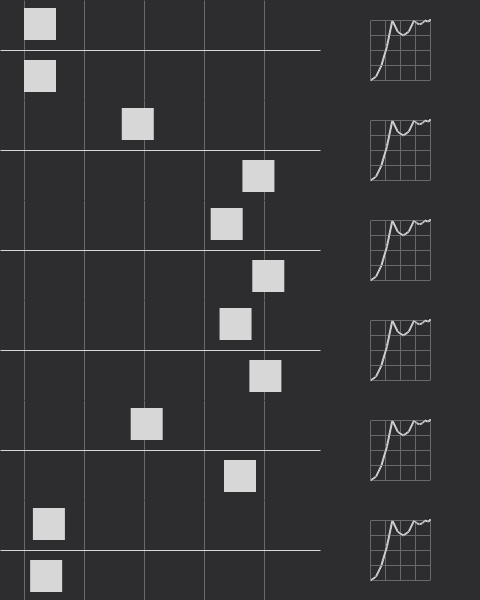
Supported easings:
- Keywords —
linear,ease,ease-in,ease-out,ease-in-out,step-start,step-end cubic-bezier(), including curves that overshootsteps()with every jumpterm —start,end,jump-start,jump-end,jump-both,jump-nonelinear(), with explicit, implicit and doubled stop positions
Requirements
Sublime Text 4. The package uses the 3.8 plugin host, declared in .python-version.
Installation
Package Control
Open the command palette, run Package Control: Install Package, and pick VisuBezier.
Manually
Clone into your Packages directory:
cd "$(python3 -c 'import sublime; print(sublime.packages_path())' 2>/dev/null || echo ~/Library/Application\ Support/Sublime\ Text/Packages)"
git clone https://github.com/mrcgrtz/visubezier.git VisuBezier
The directory must be named VisuBezier — note the capitalisation. The menu and command palette entries reference ${packages}/VisuBezier/, so a clone named visubezier loads and previews fine but has no Settings entry under Preferences → Package Settings.
Changes to files under core/ are picked up on the next reload of visubezier.py; if a pull ever seems to have no effect, restarting Sublime Text is the reliable reset.
Settings
Open them from Preferences → Package Settings → VisuBezier → Settings.
| Setting | Default | Description |
|---|---|---|
reference_easing_function |
"linear" |
Easing animated alongside yours for comparison. Any easing VisuBezier can parse. |
duration |
"1s" |
Duration of one pass of the animation, as a CSS time. |
background |
"#2d2d30" |
Background colour of the preview image. |
foreground |
"#d7d7d7" |
Colour of the curve, grid and animated squares. |
animate |
true |
When false, render a static strobe of the motion instead of playing it. |
underline |
true |
Underline easing functions in the buffer. |
underline_scope |
"region.bluish" |
Colour scheme scope used for that underline. |
selectors |
see below | Scopes in which previews are active. |
max_file_size |
1048576 |
Skip scanning buffers larger than this many bytes. |
selectors defaults to:
["source.css", "source.scss", "source.sass", "source.less", "source.stylus", "source.postcss", "text.xml"]
Matching is by scope prefix, so source.css also covers CSS embedded in HTML and text.xml covers SVG.
Post-install sample
Paste this into a CSS file and hover the values:
button {
	transition-timing-function: ease;
	transition-timing-function: ease-in;
	transition-timing-function: ease-out;
	transition-timing-function: ease-in-out;
	transition-timing-function: cubic-bezier(0.4, -0.2, 0.42, 1.2);
	transition-timing-function: steps(7);
	transition-timing-function: steps(5, jump-none);
	transition-timing-function: steps(8, jump-both);
	transition-timing-function: steps(4, jump-start);
	transition-timing-function: steps(2, jump-end);
	transition-timing-function: step-start;
	transition-timing-function: step-end;
	transition-timing-function: linear(0, 0.25 25% 75%, 1);
	transition-timing-function: linear(0, 0.063, 0.25, 0.563, 1 36.4%, 0.812, 0.75, 0.813, 1 72.7%, 0.953, 0.938, 0.953, 1 90.9%, 0.984, 1 100% 100%);
	transition-timing-function: ease, steps(3), cubic-bezier(1, 0, 0, 1), linear(0 0%, -0.25, 1.25, 1 100%);
}
How it works
Sublime Text's popup renderer, minihtml, supports neither SVG nor CSS animation, which is how the VS Code extension drew its preview. So VisuBezier rasterises the preview itself:
core/easing.pyparses and evaluates each easing — a Newton-Raphson solver forcubic-bezier(), jumpterm arithmetic forsteps(), piecewise interpolation forlinear().core/raster.pydraws into an indexed-colour canvas whose palette is a single foreground-over-background ramp, giving anti-aliasing for free.core/png.pyencodes that canvas.
minihtml also paints only the first frame of an animated GIF, so animation cannot be delegated to the image format either. An animated preview is instead a sequence of stills that the plugin cycles through with update_popup while the popup is open. core/gif.py survives for one job — generating the animated preview.gif above, via tools/make_preview.py.
All of it is pure Python with no third-party dependencies.
Differences from the VS Code extension
linear()animates. VS Code's renderer had nolinear()support, so the extension could draw the graph but fell back toeasefor the animation. Evaluating the easing directly removes that limitation.- Overshoot stays in frame. Squares are clamped to the animation track rather than escaping the preview area.
- Adjacent easings are both found. The upstream pattern consumed the delimiter after a match, so the second of
ease,easewas missed. linear()stop positions follow the spec. They are forced to be non-decreasing, and a final stop keeps its own value rather than being snapped to1.- Settings use Sublime naming and scope selectors instead of VS Code language identifiers. See the changelog for the mapping.
- No inline icon. minihtml cannot place an image inside a line of text, so matches are marked with an underline only.
Known issues
- Easing functions containing anything other than numbers are ignored, including
calc()andvar(). - Rendering an animated preview takes roughly 60 ms the first time; results are cached per easing and settings combination. Set
"animate": falsefor instant static previews. - Animation runs on a timer driven by the plugin, because minihtml supports neither CSS animation nor animated GIFs. It stops as soon as the popup closes.
Tests
python3 tests/run.py
The suite runs outside Sublime Text against a stubbed API. Encoded images are verified against ImageMagick when it is installed, and those tests skip when it is not.
Credits
Original VS Code extension by Chris Kirk-Nielsen. Sublime Text port by Marc Görtz.