LSP-addon-breadcrumb
A clean and interactive breadcrumb that shows both the file path and the current symbol hierarchy at the top of the editor.
Installations minus removals
Upgrades
- 114 installs
- 2 stars
Links
Versions
1.0.2
(ST3085+)
·
Breadcrumb for Sublime Text
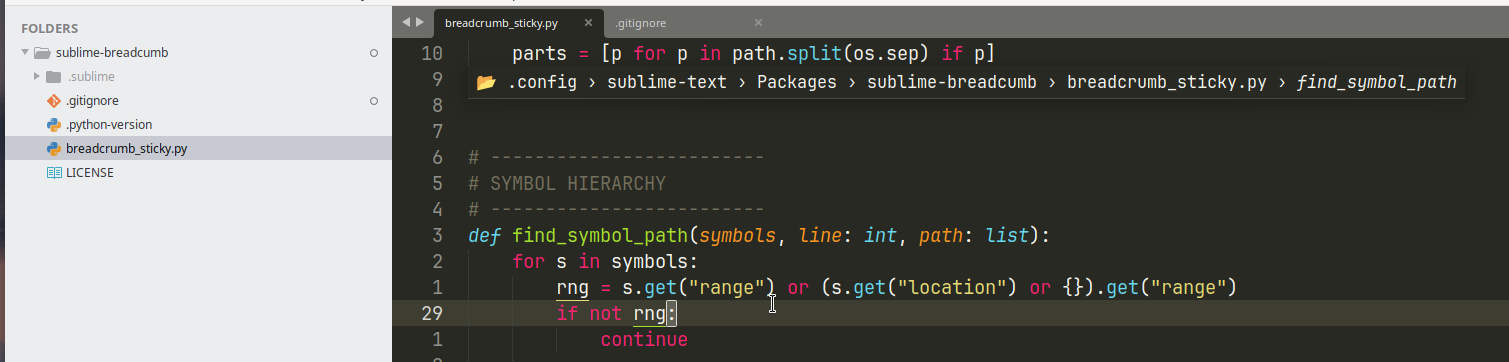
A clean and interactive breadcrumb that shows both the file path and the current symbol hierarchy at the top of the editor.
Powered by the LSP plugin for accurate, real-time symbol navigation.
Features
- Always visible at the top of the view
- Real-time updates as you move the cursor
- Lightweight and fast
- Works great with Pyright, rust-analyzer, TypeScript, clangd, gopls, etc.
What it does
Whenever you move the cursor, open a file, or switch tabs, a small popup appears at the top of the editor showing where you are:
📂 ~ › projects › myapp › src › utils.py › MyClass › render
Default behaviour (no dependencies)
Out of the box, with no extra packages installed, the plugin works standalone and shows:
- File path breadcrumb — the last 5 segments of the current file's path, with
~substituted for your home directory. That's it. The popup fires on cursor move, file load, save, and tab switch.
With LSP — symbol context
If you have the LSP package installed, the plugin will also show symbol context: the chain of symbols (class, function, method, block…) that enclose your cursor, queried live from your language server.
📂 ~ › projects › myapp › src › utils.py › MyClass › render
Without LSP, the symbol portion is simply absent — the file breadcrumb still shows normally.
Recommendation: Install LSP for the full experience. Without it the plugin is still useful, but you lose the most valuable part.
Setting up LSP
- Open the Command Palette (
Ctrl+Shift+P/Cmd+Shift+P) - Run Package Control: Install Package
- Search for and install LSP
- Install a language server for your language, for example:
- LSP-pyright for Python
- LSP-typescript for TypeScript / JavaScript
- LSP-clangd for C / C++
- LSP-rust-analyzer for Rust
The plugin automatically picks the best LSP session for the active file and uses
documentSymbolsto build the context chain. No extra configuration needed.
Manual Installation
- Download or clone this repository
- Copy the folder into Sublime Text's
Packagesdirectory:- Menu → Preferences → Browse Packages...
- Restart Sublime Text (or run
Package Control: Satisfy Dependencies)
Usage
- The breadcrumb appears automatically when you open a file with an active LSP session.
- Click on any part of the file path to open that folder.
- The display updates live on cursor movement.