Intellekt
A sublime text plugin that attempts to provide intellisense for various programming languages
Installations:
recent average 1 per week,
44 in the 53 weeks shown
Installations minus removals
Upgrades
Installations minus removals
Upgrades
- 3,014 installs
- 18 stars
Links
Version
0.1.0
·
Intellekt
A sublime text plugin that attempts to provide intellisense for various languages
Features
Java
- Method autocomplete suggestions based on imported class
- import autocomplete suggestions and navigation to documentation url
- view class/package description on click to line then hover
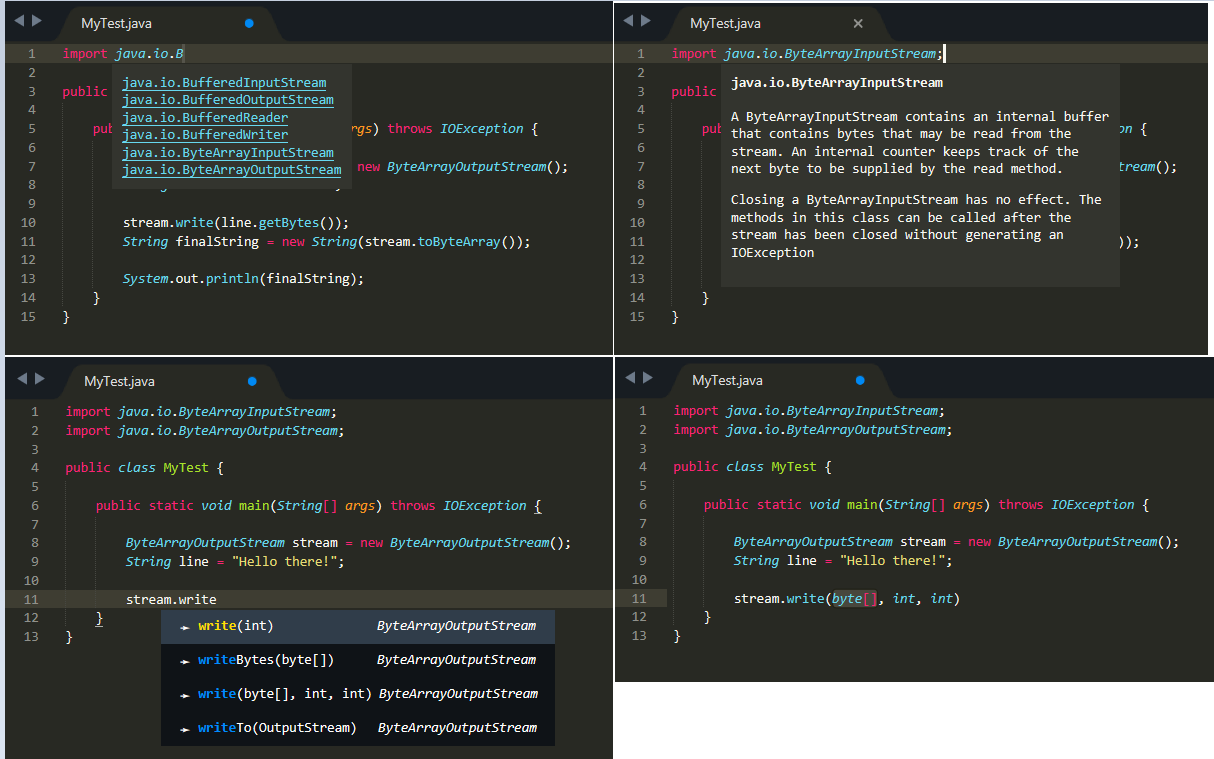
Python
- Method autocompletion
Recommended settings
Defaults live in Intellekt.sublime-settings. Leave them empty unless detection picks the wrong install. Sublime lists the file under Preferences → Package Settings → Intellekt.
{
    "python_executable": "",
    "ruby_executable": "",
    "java_home": "",
    "java_sources": [],
    "node_executable": "",
    "tsc_executable": "",
    "dotnet_root": "",
    "go_executable": "",
    "php_executable": "",
    "rustc_executable": "",
    "cxx_compiler": "",
    "perl_executable": "",
    "matlab_executable": ""
}
Commands
Open the Command Palette with Cmd+Shift+P on macOS, or Ctrl+Shift+P on Windows and Linux.
- Intellekt: Rebuild Index builds the index again, for example after you install a package.
- Intellekt: Index Status shows which toolchains were found.
TODO
- Java
- Python
- Ruby
- C/C++
- CSS
- HTML
- Javascript
- MatLab
- Perl