Confluence
Sublime Text 3 plugin for integrate with Atlassian Confluence
Installations minus removals
Upgrades
- 1,917 installs
- 8 stars
Links
Version
1.0.6
·
SublimeConfluence
Sublime Text plugin for integrating with Atlassian Confluence
Installation
Use sublime package manager
- you should use sublime package manager
- use
cmd+shift+pthenPackage Control: Install Package - look for
Confluenceand install it.
Manually
At the moment Git is required to install the plugin. You will need to clone the repository in your Sublime Text "Packages" directory:
git clone [email protected]:mlf4aiur/SublimeConfluence.git "Confluence"
The "Packages" directory is located at:
- OS X:
~/Library/Application Support/Sublime Text */Packages/ - Linux:
~/.Sublime Text */Packages/ - Windows:
%APPDATA%/Sublime Text */Packages/
Development
Use uv to set up the dependencies for local development:
uv sync
To enable reStructuredText support, install its optional dependency:
uv sync --extra rst
This development environment does not replace Package Control's dependency installation for Sublime Text.
Settings
Add the following to your User Settings file:
{
    "base_uri": "https://confluence.example.com/confluence/rest/api",
    "default_space_key": "ENG",
    "username": "username",
    "password": "password",
    "verify_ssl": true
}
verify_ssl accepts either the boolean true (the default) or a quoted path
to a PEM CA bundle. For example:
"verify_ssl": "/etc/ssl/certs/company-ca-bundle.pem"
On Windows, escape backslashes in the path, for example
"verify_ssl": "C:\\Certificates\\company-ca-bundle.pem". Disabling
certificate verification is not recommended.
If the password is unset, you need to input it every time. Avoid editing the password inline; this plugin cannot handle that correctly.
Usage
Demo
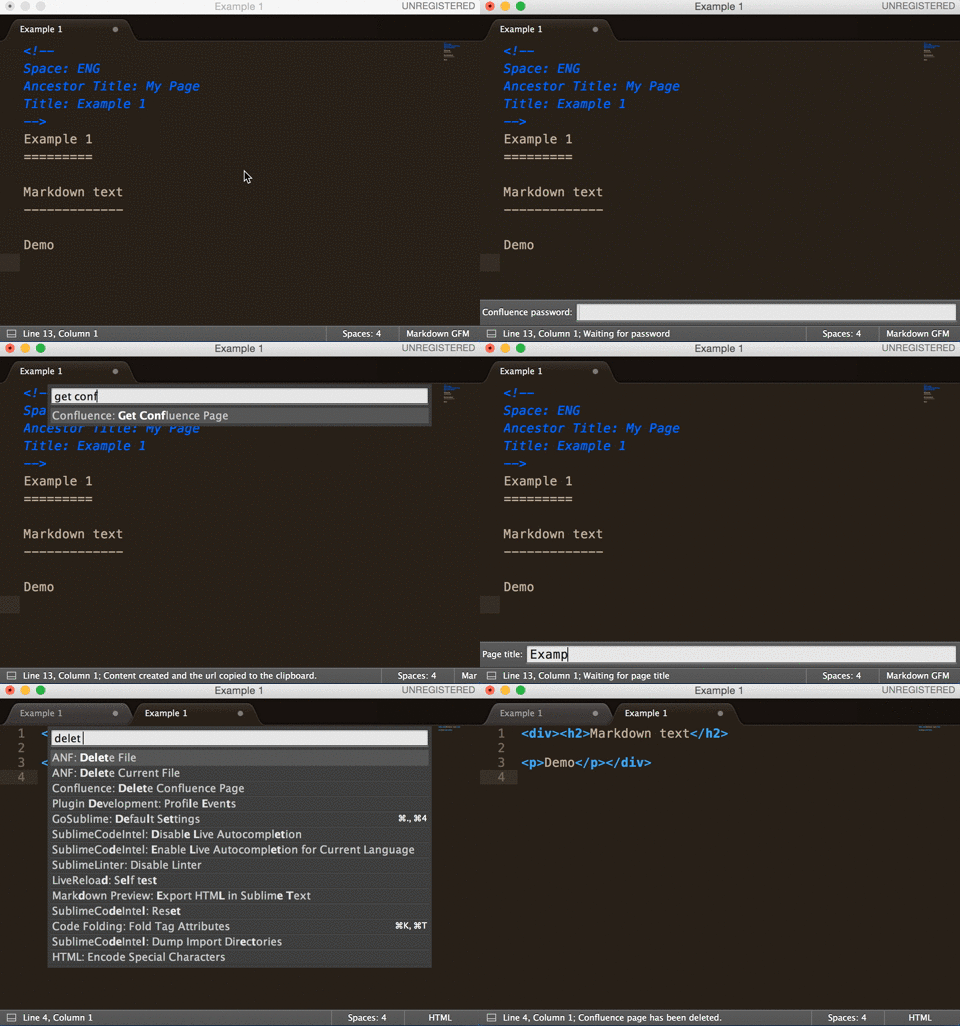
Post page to Confluence
Supported markup languages:
- Markdown, depends on python-markdown2
- reStructuredText, depends on docutils
META data must be at the head of the document, separated from the content by a newline.
Example files: example.md, example.rst.
META data:
- Space
- Ancestor Title
- Title
Use the Command Palette to run it: press cmd+shift+p, then choose
Post page to Confluence to post the local page remotely.
BTW
Confluence supports built-in markup (Textile-like) and Markdown syntax insertion.
In Confluence edit mode, press command+shift+D to insert markup text.
License
SublimeConfluence is BSD Licensed.