Biblia
Bíblia for Sublime Text: Bible verses, Strong's numbers and parallel passages through the biblia CLI
Links
Versions
0.4.0
(ST4000+)
·
Bíblia for Sublime Text
Look up Bible verses without leaving Sublime Text: in several translations at once, with the original Hebrew/Greek, Strong's numbers, dictionary senses and parallel passages, and insert them into Markdown or Typst ready to cite. Built around Portuguese references and translations (ARA, NVI, NAA...), but English, Spanish and the other translations of Bíblia Online work too. The commands and the program's output are in Portuguese.
Leia isto em português.
This package is the Sublime Text front end of biblia-cli, where it is developed; issues go there.
Requirement: the biblia program
Every lookup is done by the biblia command-line program, which has
to be installed separately. Without it, the commands report executável
não encontrado (executable not found).
Download it from the releases page:
- Linux:
biblia_<version>_linux_amd64.tar.gz(orarm64); - macOS:
biblia_<version>_darwin_arm64.tar.gz(Apple silicon) ordarwin_amd64(Intel); - Windows:
biblia_<version>_windows_amd64.zip.
Unpack it and put
biblia(biblia.exeon Windows) in a folder on yourPATH, such as~/.local/bin.Or, with Go installed:
go install github.com/casara/biblia-cli/cmd/biblia@latest.- Linux:
Check it in a terminal:
biblia jo 3.16should print John 3.16.Optional:
biblia dados baixardownloads the original-language texts, dictionaries and parallel passages (about 220 MB, or 75 MB with-enxuto). Without them, verse lookups work, but the parallel-passage commands do not.
The package looks for biblia on the PATH and then in ~/.local/bin
and ~/go/bin, which Sublime Text started from the desktop often does
not see. Anywhere else, set its full path in the executavel setting.
Commands
All of them are in the command palette (Ctrl+Shift+P, type
"Biblia"):
| Command | What it does |
|---|---|
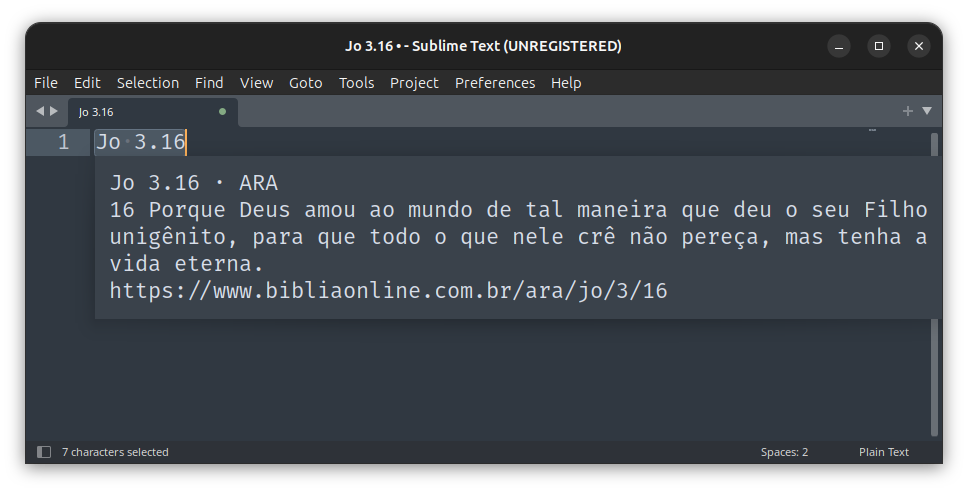
| Biblia: consultar referência selecionada | shows the text in a popup, leaving the file alone |
| Biblia: inserir texto no lugar da referência | replaces the selected reference with its text |
| Biblia: consultar… | asks for a reference and shows its text |
| Biblia: passagens paralelas da referência selecionada | shows the text and the list of parallel passages (Old Testament quotations in the New, Gospel parallels...) |
| Biblia: inserir o texto das passagens paralelas | keeps the reference and inserts, on the lines after it, the text of each parallel passage, saying what it is |
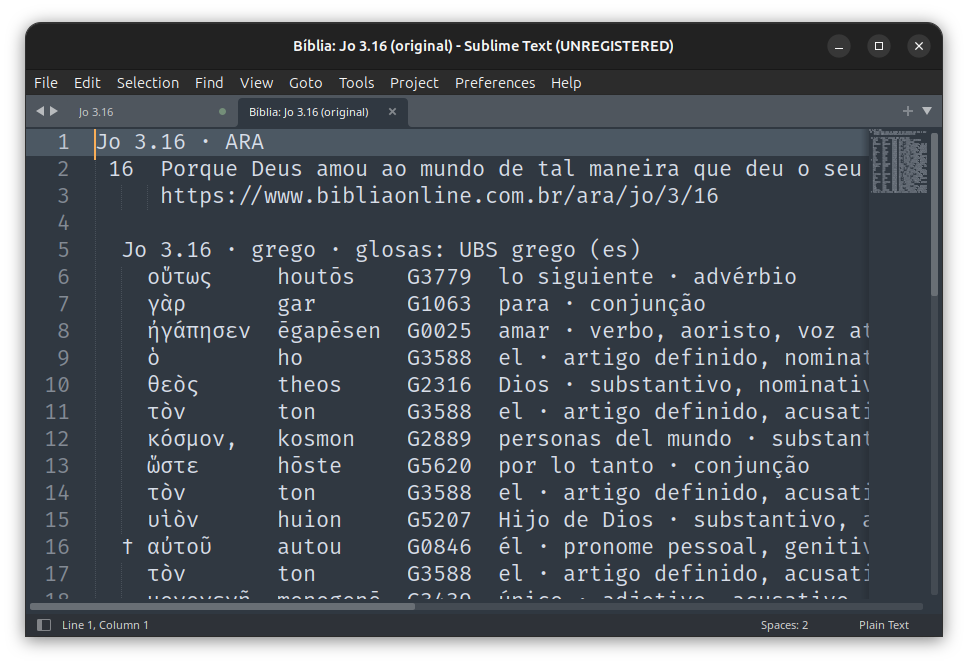
| Biblia: consultar com o original (hebraico/grego e Strong) | opens a read-only tab with the text and, word by word, the Hebrew/Greek original, transliteration, Strong number, gloss and grammar |
| Biblia: Strong… | the lexicon entry of the Strong number under the cursor (G25, H7451b); otherwise asks for a number, transliteration or gloss |
| Biblia: consultar em outras traduções… | asks which translations to use this time (ara,naa,nvi), then works like consultar |
| Biblia: inserir texto em outras traduções… | asks which translations to use this time, then works like inserir |
With no selection, the cursor line counts. References are typed the
Brazilian way: Jo 3.16, 1 Co 13.4-7, Rm 5.8; 6.23, Sl 23.
The original and Strong commands use a Bíblia tab instead of the
popup, because the interlinear columns need a monospaced font; Strong
entries go to a second tab, leaving the interlinear in place. In the
original tab, put the cursor on a Strong number and run Biblia: Strong… to
see its entry. The gloss search uses the dictionaries' language:
Portuguese for Hebrew, Spanish for Greek. The translation prompt starts
from the last choice (or versoes) and leaves the settings alone. The
original and Strong commands need biblia dados baixar.
Key bindings
The package enables no key bindings. Suggested ones, free in Sublime
Text's defaults and in the common desktop shortcuts, are in its
Example.sublime-keymap, which Sublime Text does not load: open
Preferences › Package Settings › Biblia › Key Bindings (or
Preferences: Biblia Key Bindings in the palette) and copy the ones you
want into your own keymap, on the right:
[
  { "keys": ["ctrl+alt+b"], "command": "biblia_consultar" },
  { "keys": ["ctrl+alt+shift+b"], "command": "biblia_inserir" },
  { "keys": ["ctrl+alt+l"], "command": "biblia_paralelos" },
  { "keys": ["ctrl+alt+shift+l"], "command": "biblia_inserir_paralelos" },
  { "keys": ["ctrl+alt+o"], "command": "biblia_original" },
]
Settings
Preferences › Package Settings › Biblia › Settings:
| Setting | Default | What it does |
|---|---|---|
executavel |
biblia |
the program, by name or full path |
versoes |
(empty) | translations, comma-separated (ara,naa); empty uses the program's config file |
formato |
auto |
format of the inserted text: auto, linha, md, typ or a template of your own |
formatos_por_extensao |
.md → md, .typ → typ |
for auto: file extension → format; without a match, the file's syntax (Markdown, Typst) decides |
In auto, Markdown files get a quotation with the reference, Typst
files get #bref(...) preceded by a // conferido: ARA · ... · date
line, and other files use the program's formato_filtro setting. The
formats, the template fields and the program's config file are
documented in the
biblia README.
What leaves your machine
The package itself makes no network connection: it only runs the
biblia program. The program sends the references you look up (book,
chapter, verses and translation, nothing else from the file) to Bíblia
Online's server, unless the verses are already in its local cache.
biblia dados baixar downloads the STEPBible and UBS data from GitHub,
once. The original-language, Strong and dictionary commands work from
that local data, offline.
Sources and credits
- Bible text: Bíblia Online, through the service the site publishes for programs, at most 5 verses per lookup. Each translation has its own rights holders; neither the package nor the program ships Bible text.
- Original languages, lexicons and grammar: STEPBible (Tyndale House, Cambridge, CC BY 4.0), downloaded on demand.
- Dictionaries and parallel passages: United Bible Societies (ubs-open-license, CC BY-SA 4.0), downloaded on demand.
License
MIT. The data keeps its sources' licenses.